UO Oasis Wiki

A living reference for how UO Oasis actually plays right now. For a history of what changed and when, see Patch Notes instead.

Housing & Cellars

House Cellars

Build a full underground floor beneath any house, generated to match your house's exact footprint - small house, small cellar; sprawling custom home, equally sprawling cellar.

  • Getting a Cellar Deed: buy one from the Real Estate Broker for 120,000 gold, or redeem 750 Quest Points at the Quest Rewards vendor under Cosmetics & Decoration.
  • Building it: double-click the deed, choose from 14 floor styles (Grass, Marble, Crystal, Dungeon, and more), then target a spot inside your house for the entrance stairs.
  • Storage bonus: +500 lockdowns and +250 secures automatically while a cellar is built - on top of the extra floor space itself.
  • Demolishing is safe: chop it down with an axe and everything inside - locked down or secured - moves straight into your house's Moving Crate, never scattered or lost. Retrieve it via the house menu's "Relocate Moving Crate" option, or the [MovingCrate command to drop it at your feet.

Bank Storage

Your bank box holds 375 items (up from the classic 125), with unlimited weight. Regular backpacks, chests, and other containers use their normal capacity.

House Doors & Decay

  • Newly placed house doors default to "Owner Only" access - check a door's "Set Access" gump to change it.
  • Houses tied to an inactive account don't start decaying until 6 months of inactivity.
  • If your UO account is linked on the website, you'll get an email reminder once a house is within a week of collapsing, repeating every few days until it's safe again - see Website Account Tools.

Grimoire Progression

A long-term leveling system layered on top of combat - the more you fight with a weapon type or with spells, the stronger that Grimoire makes you.

  • Buy a Weapon Grimoire (Macing, Swords, Fencing, or Archery) or a Magic Grimoire from the Grimoire Master vendor - a blessed book that works from your backpack, no need to equip it.
  • Land the killing blow with the matching weapon type (or a damaging spell, for the Magic Grimoire) to earn experience toward that Grimoire.
  • 20 levels total, with experience needed roughly doubling for the first several levels before leveling off.
  • Every level-up grants one permanent bonus of your choice - extra weapon/spell damage, faster swing or casting speed, better hit chance, life/mana leech, and more. Higher levels open more choices at once.
  • Category-specific bonus scrolls award points spendable on: buying down XP needed for your next level, upgrading a bonus you've already picked, or unlocking an extra pick at a level you've already passed.
  • You may own one Grimoire of each weapon type plus one Magic Grimoire simultaneously, all working together.

The Grimoire Master's menu - each category gets its own color:

Kill-Quests & Dungeon Bonuses

Kill-Quests

  • Take a quest from a quest-giver or the quest board to hunt a specific monster family for a set number of kills, tracked automatically as you fight.
  • Type [Hunts anytime to open your quest log and check progress on everything active.
  • Finishing a hunt pays out Quest Points - open your [Hunts log and click "Claim Reward" on any completed hunt.

Quest Points Reward Vendor

A 130+ item reward list spanning Gear & Equipment, Resources & Materials, and Cosmetics & Decoration. Gear rewards are priced off their actual stats rather than a flat rate, and every item shows a full hover tooltip before you commit. Quest Points can also be converted directly into Account Sovereigns toward the EA Ultima Store.

Rotating Dungeon Bonuses

Two dungeons are spotlighted at all times - one re-rolled daily with a smaller gold bonus, one re-rolled weekly with a bigger one, plus better bonus-treasure odds for kills inside either. Check [BonusDungeons to see which two are active and how much time is left.

Repair Benches

Placeable repair benches work exactly like the NPC blacksmith's service - 50 gold per point of durability restored, pulled from your gold or bank balance, no deeds or charges required. Use "Repair All" to fix your whole pack at once in a single all-or-nothing transaction.

Creatures & Taming

Tameable Rarity Tiers

Dragons, Greater Dragons, White Wyrms, Nightmares, Cu Sidhe, Hiryu, Lesser Hiryu, and Reptalons can spawn in one of four tiers:

  • Normal (70% of spawns)
  • Rare (20%, blue name) - stronger, extra trained abilities
  • Epic (8%, purple name and hue) - stronger still
  • Legendary (2%, gold name and hue) - the strongest, and can hold more trained abilities than any other pet in the game

Fully trainable through normal Animal Lore once tamed. Instant-bonding cost at the Animal Trainer scales with tier: 10,000gp Normal, 20,000gp Rare, 40,000gp Epic, 60,000gp Legendary.

Elite Monsters

  • Voidtouched (dark-hued Lich) - Wrong dungeon, drains life on hit.
  • Ashen (amber-hued Fire Elemental/Drake) - Destard, fiery burst that briefly weakens fire resistance.
  • Rimebound (teal-hued Frost Troll/Ice Fiend) - Ice dungeon, can freeze you in place briefly.
  • Feral (blood-red wolves) - roam anywhere in Felucca, get faster once badly wounded.
  • All four drop bonus loot on death and cannot be tamed.

Paragons

The rare, gold-hued Paragon variant can spawn on Felucca, Ilshenar, Malas, Tokuno, and Ter Mur - anywhere you're playing, not limited to one facet. Buffed stats, gold hue, and bonus loot chance work as normal.

Ethereal Mounts

Riding an Ethereal mount costs 0 follower slots, leaving your full pet count free for creatures that actually fight alongside you.

Treasure Hunting

Finding a Map

Treasure maps drop from a wide range of dangerous creatures. Rates are tuned to feel like a genuine bonus rather than a guarantee - including on High Seas bosses (Leviathan, Charybdis, Osiredon, Corgul) and other tough dungeon spawns, all balanced to a consistent, fair rate rather than any single creature dominating the drop pool.

Map Levels

Every map shows its level right in its properties (hover over it) - no more guessing how hard one is before you commit to decoding it:

  • Level 1 (Stash) - easiest, lowest Cartography requirement
  • Level 2 (Supply)
  • Level 3 (Cache)
  • Level 4 (Hoard)
  • Level 5 (Trove) - hardest, best rewards

Decoding

Double-click a map to decode it - your chance to succeed scales with your actual Cartography skill against that map's level, and you can gain Cartography from attempts whether they succeed or not. Higher-level maps genuinely need real skill investment to decode reliably; there's no way to shortcut a hard map with little to no Cartography.

World & Rules

Felucca-First

  • Felucca is the shard's primary facet - new characters start there.
  • Open PvP (Felucca ruleset) extends to Ilshenar, Malas, Tokuno, and the Eodon Valley, not just Felucca itself.
  • Trammel is hidden from normal play - public moongates don't list it, and Recall/Gate Travel/Sacred Journey/teleporters won't take you there.
  • Guarded towns are unaffected - guards still respond normally to murderers and criminals in Malas, Tokuno, and TerMur town centers.
  • Felucca's +1000 luck bonus shows up directly in your character's Luck stat.

Town Invasions

A staff-run large-scale event that throws an entire Felucca town into chaos:

  • Any of 12 Felucca towns - Buccaneer's Den, Cove, Delucia, Jhelom, Minoc, Moonglow, Nujel'm, Ocllo, Papua, Skara Brae, Vesper, or Yew - can be put under siege at a scheduled time.
  • Waves of themed monsters flood the town first, then a champion boss (Barracoon, Harrower, Lord Oaks, Mephitis, Neira, Rikktor, Semidar, or Serado) arrives once regular waves are cleared.
  • Town guards stand down for the duration - the whole city is fair game until the invasion ends.
  • A shard-wide announcement rings out when a town comes under siege, and periodically while it's ongoing.
  • Each town needs an hour to recover before it can be invaded again.

Economy & Account Limits

  • 3 accounts per IP address.
  • Magic item and artifact drop rates are tuned for rarer, more meaningful finds rather than a flood of magic items.

Character & Skills

Free Skills

23 skills no longer count against your 720 total skill cap - raise as many as you like on top of your main template, each still capped individually (100, or higher with power scrolls):

  • Alchemy
  • Arms Lore
  • Begging
  • Camping
  • Cartography
  • Cooking
  • Detect Hidden
  • Fishing
  • Forensic Evaluation
  • Herding
  • Hiding
  • Inscription
  • Item Identification
  • Lockpicking
  • Lumberjacking
  • Mining
  • Musicianship
  • Remove Trap
  • Snooping
  • Taste Identification
  • Tracking
  • Meditation
  • Focus

Unique Character Names

Character names are enforced as unique shard-wide - new characters, name-change deeds, and name-change tokens can't take a name already in use.

Getting Around

Recall and Mark can be cast successfully by any character regardless of Magery skill - the skill-based fizzle chance for these two spells is removed. You still need reagents (or a Runebook/Arcane Gem charge), mana, and normal cast time; all other travel restrictions still apply.

Quality of Life

Hunger / Well Fed

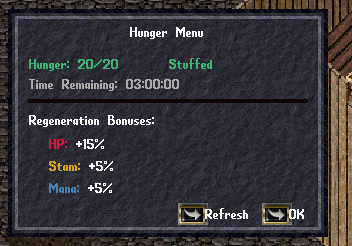
Staying fed grants real regeneration bonuses. Type [hunger (or [buffs), or right-click your own character and choose Hunger Menu, to see your status.

  • Fullness ranges from Starving up through Satisfied, Full, and Stuffed at maximum - higher status means a bigger Hits/Stamina/Mana regeneration bonus, up to +15% Hits and +5% Stamina/Mana when Stuffed.
  • Eating tops up your meter; topping off from empty lasts a full 3 hours.
Global Chat

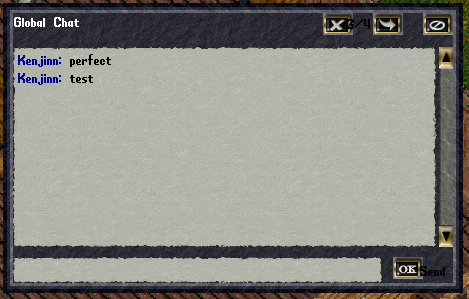
  • Type [c or [chat to open the Global Chat window - movable and resizable, with a running scrollback of recent messages.
  • Type [c or [chat directly followed by a message (e.g. [c hello everyone) to send instantly without opening the window first.
  • Every player shows in a consistent, distinct color so it's easy to tell who's talking; staff messages always show in gold.
  • [ChatToggle lets you fully opt in or out at any time.
Equipment & Gear

  • Double-click to equip: double-click any weapon, armor piece, shield, clothing item, or jewelry in your own backpack to equip it instantly - no dragging required. Only works on items already in your own backpack.
  • No "Elves Only" restriction: items that used to require an Elf character can be equipped by any race, with no visual downside. "Gargoyles Only" gear remains restricted since Gargoyle body art doesn't fit other races.

RazorEnhanced

Razor and RazorEnhanced can run side by side. To enable RazorEnhanced, add it to your plugins list in settings.json alongside Razor:

"plugins":
	[
		".\\Razor\\Razor.exe",
		".\\RazorEnhanced\\RazorEnhanced.exe"
		],

Bringing Your Macros & Layout

Already playing elsewhere and don't want to rebuild your macros, hotbar, and gump layout from scratch? ClassicUO keeps that setup in a per-character profile folder, and you can copy it straight over:

  1. Log into UO Oasis with the character you want to set up at least once, then fully close the client. This makes ClassicUO create the correctly-named profile folder for that character - you need this folder to exist before copying anything in.
  2. In the UO Oasis install folder, find ClassicUO\Data\Profiles\<your account name>\<server name>\<character name>\. On a default install this is under C:\Program Files (x86)\Ultima Online Oasis\.
  3. Find the matching character folder in your old client's install (same path pattern, different account/server names) and copy these two files over, replacing the empty ones UO Oasis just created:
    • macros.xml - your hotbar and macros
    • gumps.xml - your window positions and layout
  4. Optionally copy profile.json too for the rest of your settings (target queue, filters, counters, and similar preferences) - just this one file, not the whole folder, so you don't overwrite anything UO Oasis-specific.
  5. Relaunch UO Oasis and log into that character - your macros, hotbar, and window layout should now match your old setup.

Do this per character - each character has its own profile folder. If a step doesn't quite match what you see (folder names are case-sensitive and depend on exactly how your account/character names are stored), stop and ask on Discord rather than guessing - copying the wrong file can overwrite a layout you meant to keep.

Website Account Tools

A website login, separate from your in-game UO account, that manages your actual UO accounts and characters from your browser.

  • Create a free account with just your email, with optional two-factor authentication (TOTP) via any standard authenticator app.
  • Link up to 3 UO accounts to your website login (matching the 3-accounts-per-IP rule) by proving each account's current password once.
  • Character dashboard: every linked account's characters, with a full stat sheet and equipment paper-doll - hover any item for its properties.
  • House tracker: name, type, public/private status, decay level, and a live countdown to estimated collapse for every house you own.
  • Self-service UO password reset: request it from your dashboard, confirm via an emailed link, set a new password - no need to wait on staff.
  • House decay email reminders: once a linked house is within a week of collapsing, you'll get an email, repeating every few days until it's safe again.
  • Sync Data: data refreshes automatically several times a day, or force an immediate refresh yourself (rate-limited for regular players).